
Everything a first launch needs, written down and organised.
A practical workbook, printable worksheets, an offline planner, prompt libraries and design assets for independent creators. One download for $49, delivered to your verified account — no subscription, no software to log in to.
- 159 files in one ZIP
- Instant access after verification
- Seven-day refund window
- Business use permitted
- Trusted by independent creators and POD sellers
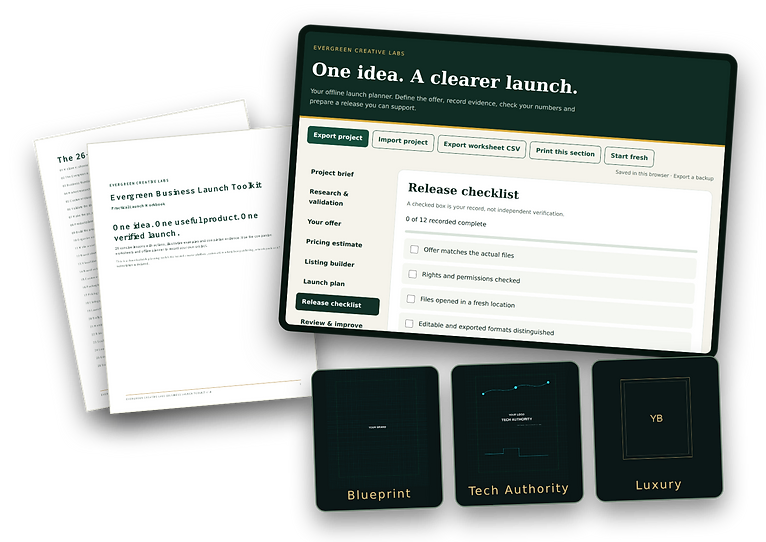
Most launches stall between the idea and the sale.
Not because the idea is weak — because the work of turning it into something you can sell is scattered across tools, tabs and memory.
The files are everywhere
Notes in one app, drafts in another, a folder of half-finished designs, and no clear version of the truth.
The order is unclear
You know roughly what a launch needs, but not which step comes first, or what "done" actually looks like.
The plan stays in your head
Pricing, positioning, the offer description and the launch steps never make it into anything you can work from.
How the pack organises the work
Three jobs, in order. Each one has a document in the pack that holds the result.
- Step 1
Collect
The worksheets and prompt libraries pull the scattered pieces — idea, buyer, offer, price — into one written record.
- Step 2
Decide
The guide set walks the decisions in order, with a checklist, so an open question stays visible instead of quietly blocking the launch.
- Step 3
Prepare
The planner and design assets turn those decisions into a plan you can follow and covers or pages you can actually use.
What is included
Six categories, 6 kinds of working material. Every item below is in the ZIP.
The practical guide set
Read it in order, or jump to the part your launch needs.
- Start Here, Quick Start and First Product Launch Guide
- 26-lesson practical workbook in PDF and editable Markdown
Turns a vague launch intention into a sequence of named steps you can work through in an evening.
Worksheets and checklists
The thinking work, written down instead of kept in your head.
- Eight worksheets in Markdown and CSV, with printable PDF pages
- Operating checklists for the launch itself
Gives each decision a place to land, so you can see what is decided and what is still open.
The offline planner
A local planning tool that needs no account and no subscription.
- Offline planner with project backups
- CSV export and a pricing estimator
Keeps your project plan and price sanity-check in one file you own, with a backup you export yourself.
The prompt libraries
Starting points instead of blank pages.
- 25 workflow prompts
- 100 creator and launch prompts
Gives you a useful first draft of the wording for a product page, email or launch note.
Design assets
Source files you can open, recolor and reuse.
- 53 SVG sources with matching PNG exports, 45 distinct rendered appearances
- Color palettes, typography suggestions and a visual asset catalog
Gives a consistent look to covers, worksheets and social images without starting from a blank canvas.
Licenses and reference
So you know what you may do with what you bought.
- License documents for the included material
- Visual asset catalog reference
Answers the business-use questions before you publish anything made from the pack.
A look at the material
Guides, worksheets, the planner and the design assets, as they are structured in the pack.
Start Here
Your first product launch
Lesson 01 · Choose one idea
Lesson 02 · Describe the buyer
Lesson 03 · Define the deliverable
Worksheet
Offer worksheet
Markdown · CSV · PDF
Offline planner
Design assets
Illustrative previews of the document types in the pack. The full file list is shown above.
Who it is for — and who it isn’t
Being clear about this saves everyone a refund request.
A good fit if
- You have a product, service or idea and want a written launch plan.
- You would rather follow a sequence than assemble one from scratch.
- You are comfortable opening a PDF, a CSV and an SVG file.
- You want a one-time purchase, not another subscription.
Look elsewhere if
- You need a hosted workspace, dashboards or software to log in to.
- You want files generated or published for you automatically.
- You are looking for guaranteed sales, traffic or income.
- You need original design work commissioned rather than templates.
Buying, verifying your email and downloading
Three steps. The download is tied to your verified account, which is what lets you come back for it later.
- 1
Pay once on Stripe
The Resource Pack is a single $49 USD purchase. Applicable tax is shown before you pay, and Stripe handles the card details.
- 2
Create your account with the same email
Payment does not create a password. Sign up with the email you used at checkout, then enter the verification code sent to that address.
- 3
Download from your dashboard
Your verified purchase appears under My Downloads. Open the ZIP, read Start Here, and come back any time to download it again.
Already bought the pack? Go to My Downloads.
Walking through the pack
What you see when the ZIP is opened, and where to start.
Resource Pack walkthrough
A short screen recording of the pack being opened is not published yet. Until then, the previews above and the full file list show exactly what is in the ZIP.
Video coming soonBuying questions
The practical things people ask before buying.
Still deciding? Ask a question before buying or read the refund policy.
Support before and after you buy
Questions about whether the pack fits your project go through the contact page, where you can send an email directly. After purchase, missing or unreadable files are handled through customer support in your account — fixed or refunded, within the seven-day window.
Start the launch you keep postponing.
One download, $49 once. Read Start Here tonight and you will know the next three things your product needs.
Digital download. Hosted memberships, AI services and automated publishing are not part of this purchase and are not currently for sale.